Preview image. Unlock full-res
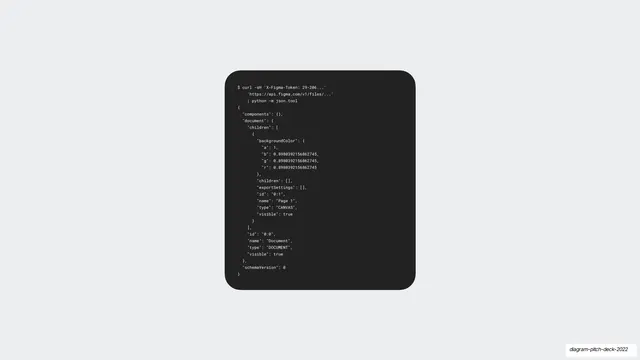
A dark rounded terminal card showing a curl call to the Figma API piped to json.tool, printing a document tree as formatted JSON.
Summary
A developer-facing slide: a dark rounded terminal panel centered on light gray, showing a curl request to the Figma files API piped through python json.tool, with the returned document JSON pretty-printed.
Visual description
A single near-black rounded code card floats on pale gray. Inside, light monospace text shows a shell command, curl with an X-Figma-Token header hitting api.figma.com/v1/files/... piped to "python -m json.tool", followed by the formatted JSON response: a "document" object with a "children" array, a "backgroundColor" with r/g/b/a floats, a CANVAS node named "Page 1", and top-level "id", "name": "Document", "type": "DOCUMENT", and "schemaVersion": 0. The dark card is the lone object, a deliberate contrast to the deck's otherwise light, visual slides.
Key takeaway
One dark monospace terminal card dropped into a light visual deck instantly signals "there is real engineering here" and re-pitches to a technical audience. Showing an actual API response (not pseudo-code) reads as concrete and credible.
Reuse notes
Use to establish technical depth or an API/platform story inside an otherwise design-led pitch. The dark card on a light field is a clean, reusable way to set code apart. Keep the snippet short and real. Pairs well when the audience includes engineers or technical investors.
From this deck: Figma API JSON in dark terminal
View deck









More like this
Keep what you find
A free account saves references to boards and can send you a weekly email of picks based on what you save.
To see every result, go Pro.