Preview image. Unlock full-res
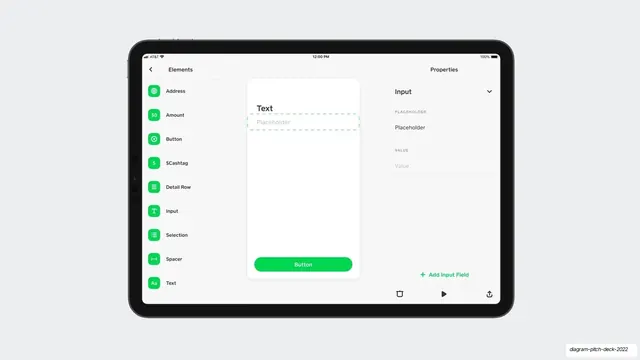
A tablet UI mockup of a Cash App form builder, with an Elements list on the left, a live canvas center, and a Properties panel on the right, floated on a pale gray background.
Summary
A single landscape tablet mockup of a Cash App element-building tool, centered on a soft gray slide. It shows a three-pane builder: a component palette, a working canvas, and a properties inspector.
Visual description
A horizontal iPad frame floats on a pale gray (#ECEDEF) field with no other slide chrome. Inside the device, a black status bar reads 12:00 PM and 100%. The interface is a light three-column builder. The left rail, headed "Elements" with a back chevron, lists rows each with a rounded green icon tile: Address, Amount, Button, $Cashtag, Detail Row, Input, Selection, Spacer, Text. The center canvas holds a white card with a "Text" label and a dashed-outline "Placeholder" input being edited, plus a full-width pill "Button" in Cash App green at the bottom. The right rail, headed "Properties," shows an "Input" panel with PLACEHOLDER and VALUE fields, an "Add Input Field" link in green, and a small toolbar of delete, play, and share icons at the bottom.
Key takeaway
Showing a real product as a clean device mockup floating on a flat neutral background, with no caption competing for attention, lets the UI itself carry the slide. The single green accent threaded through icons, the active button, and the action link keeps a dense three-pane tool feeling calm and branded.
Reuse notes
A strong template for a product or portfolio slide that needs to show a working interface without explanation. Works best when the UI is genuinely tidy and uses one accent color. The empty gray surround is forgiving of any device aspect ratio.
From this deck: Cash App element builder tablet mockup
View deck






More like this
Keep what you find
A free account saves references to boards and can send you a weekly email of picks based on what you save.
To see every result, go Pro.