Preview image. Unlock full-res
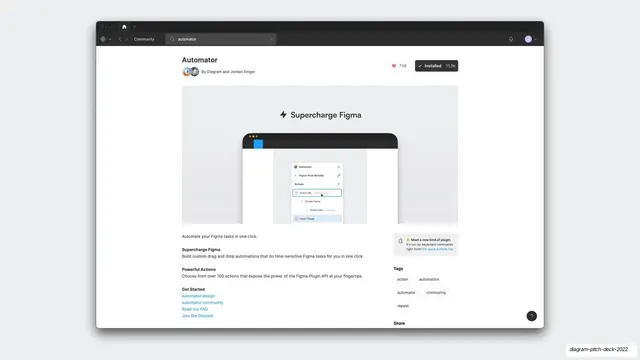
A Figma Community listing for the Automator plugin showing a Supercharge Figma hero, 11.9k installs, author credit, and tags.
Summary
The Automator plugin's real Figma Community page: title and authorship, a large "Supercharge Figma" cover, an "Installed 11.9k" button, descriptive sections, and a tag list, presented as proof of an established product.
Visual description
A dark-chrome app window (community breadcrumb, an "automator" search field) frames a light listing page. The header reads "Automator" with "By Diagram and Jordan Singer" and two avatars, a heart count of 736, and a black "Installed 11.9k" button. A wide cover image shows "Supercharge Figma" above a laptop displaying the Automator plugin running. Below, left-column copy ("Automate your Figma tasks in one click", "Supercharge Figma", "Powerful Actions", "Get Started" with blue links to automator.design, automator.community, FAQ, Discord); the right column holds a "Meet a new kind of plugin" note, a "Tags" group (action, automation, automator, community, repeat), and a "Share" header. The native Community UI signals legitimacy and adoption.
Key takeaway
Dropping the actual platform listing, with its install count and authorship, into the deck is hard evidence that beats a self-made stat card. The visible "Installed 11.9k" and named creators do the persuading.
Reuse notes
Use to substantiate traction or distribution by showing the product live on a third-party platform (an app store, plugin community, package registry). The native chrome and real metrics carry the credibility. Capture at a moment when the numbers are flattering.
From this deck: Automator Figma Community page
View deck




























More like this



Keep what you find
A free account saves references to boards and can send you a weekly email of picks based on what you save.
To see every result, go Pro.