Preview image. Unlock full-res
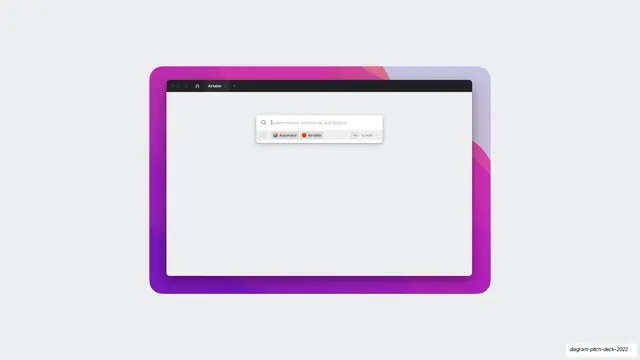
A browser-framed empty canvas with a floating command palette searching menus, commands, and plugins, listing Automator and Airtable.
Summary
A nearly empty editor canvas with one floating command-palette popover near the top, its search field reading "Search menus, commands, and plugins" above a row of recent items, Automator and Airtable.
Visual description
A rounded browser-style window with a dark title bar (traffic dots, home icon, an "Airtable" tab) fills most of the frame on pale gray. The canvas is intentionally blank except for a small white command-palette card pinned high and centered: a magnifier and the placeholder "Search menus, commands, and plugins", then a recents line showing a clock icon, an "Automator" chip (colorful gradient mark), an "Airtable" chip (red mark), and a right-aligned "Tab to edit" hint with a small Tab key cap. The emptiness around the palette makes the keyboard-driven entry point the sole focus.
Key takeaway
Isolating a command palette on an otherwise empty canvas frames a product as fast and keyboard-first. The "Tab to edit" affordance and recents chips quietly communicate a power-user workflow without explanation.
Reuse notes
Good for tools that lead with a launcher, command bar, or quick-actions surface. The deliberate emptiness sells speed and focus. Reuse the recents-chips-plus-keyhint pattern to imply an established, repeatable flow. Needs a recognizable palette UI to land.
From this deck: Automator command palette in browser
View deck








More like this
Keep what you find
A free account saves references to boards and can send you a weekly email of picks based on what you save.
To see every result, go Pro.