Preview image. Unlock full-res
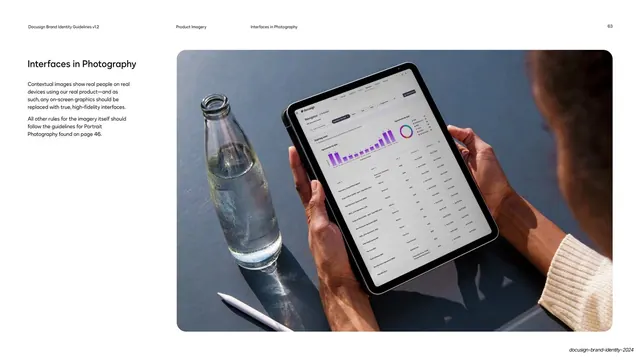
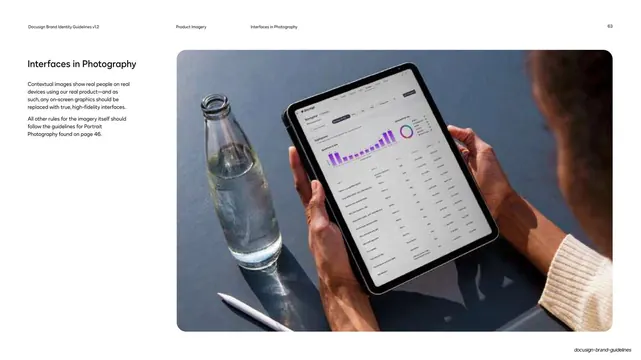
Guideline page on interfaces in photography, shown by a full-bleed lifestyle photo of hands holding a tablet running the real Docusign app.
Summary
A guideline page on interfaces shown in photography: contextual images of real people on real devices, where any on-screen graphic must be replaced with a true high-fidelity interface.
Visual description
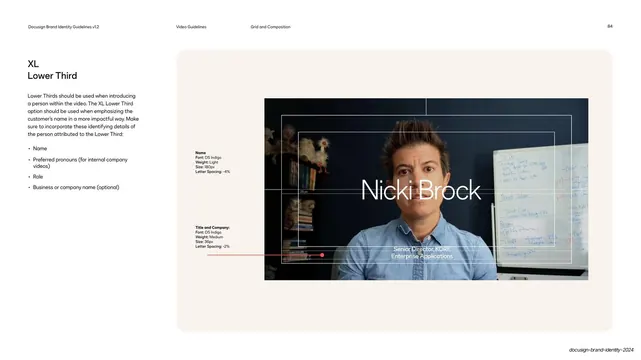
White page, standard running header (page 63). The left column is brief: the "Interfaces in Photography" headline and two short paragraphs in dark indigo, pointing the reader to the Portrait Photography rules. The right two-thirds is a single large photographic specimen: a top-down lifestyle shot of two brown hands holding a tablet that displays a real Docusign Navigator dashboard (bar chart, donut, agreement table), shot in natural light on a slate-gray surface with a glass water bottle and a stylus alongside, casting long soft shadows.
Key takeaway
The rule made visible: when the product appears inside a photo, the screen carries the actual high-fidelity UI rather than a placeholder. Natural light and real props keep it editorial rather than staged.
Reuse notes
Use for lifestyle or in-context product shots on landing pages and decks. The non-negotiable is compositing a true UI onto the device screen. Pairs with the deck's Portrait Photography rules for talent and lighting. Needs real photography plus a clean UI screen to composite.
From this deck: Interfaces in photography guidance
View deck


























More like this






Keep what you find
A free account saves references to boards and can send you a weekly email of picks based on what you save.
To see every result, go Pro.