Preview image. Unlock full-res
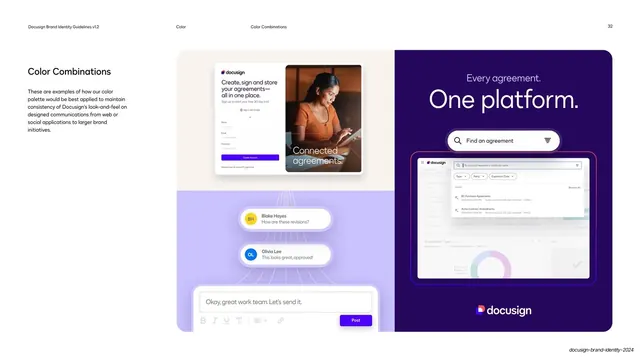
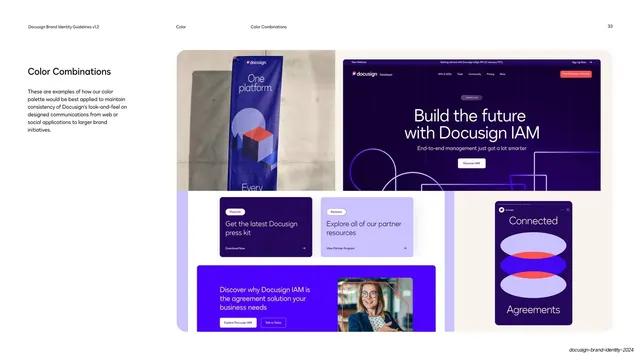
Applied color page showing the palette across a physical event banner, a developer site hero, press-kit cards, an IAM promo, and a chat widget.
Summary
A second applied-color page: the palette across a physical roll-up event banner, a dark developer-site hero, two press-kit cards, a cobalt IAM promo, and a small "Connected Agreements" chat widget.
Visual description
Standard page chrome ("Color" / "Color Combinations", page "33"). The left column heading "Color Combinations" sits over the same short paragraph about applying the palette. The right two-thirds is a bento of mockups: top-left, a photo of a physical roll-up banner ("One platform.") with an isometric cube graphic, standing against a concrete wall; top-right, a dark violet developer-site hero ("Build the future with Docusign IAM") with outlined geometric line art and a "Discover IAM" button; center, two press-kit cards (a deep-violet "Get the latest Docusign press kit" and a lavender "Explore all of our partner resources"); a cobalt promo bar ("Discover why Docusign IAM is the agreement solution your business needs") with a portrait photo; bottom-right, a small dark widget reading "Connected Agreements" with stacked ellipse graphics.
Key takeaway
Mixing a real-world photographed banner with digital mockups on one page shows the palette living across physical and screen media. The recurring deep-violet/cobalt backgrounds with poppy accents tie disparate touchpoints into one system.
Reuse notes
A reusable applied-color page for brands that span print, OOH, web, and product. Include at least one photographed real-world artifact alongside the screen mockups so the palette is shown surviving physical production, not just RGB.
From this deck: DocuSign color in banners and social
View deck