Preview image. Unlock full-res
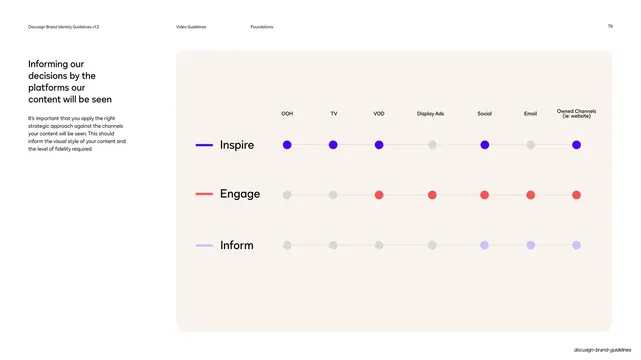
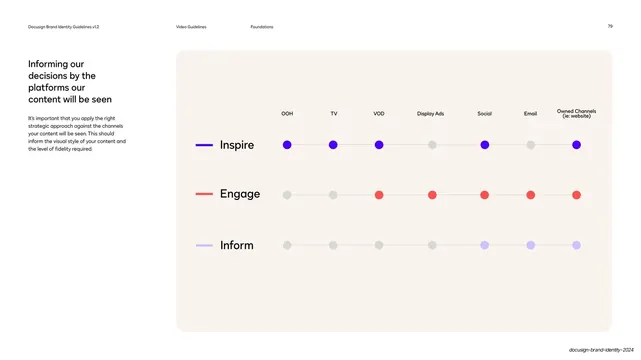
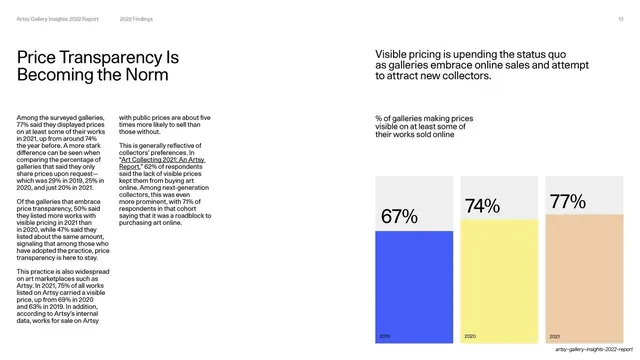
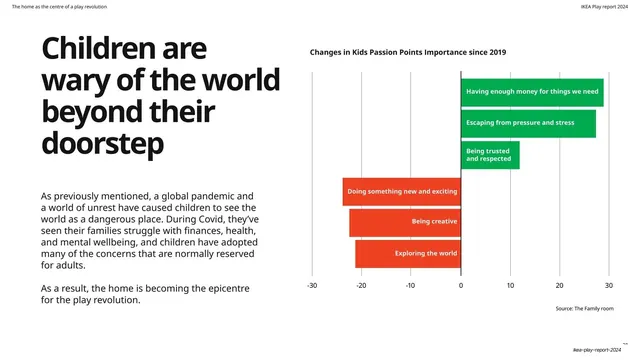
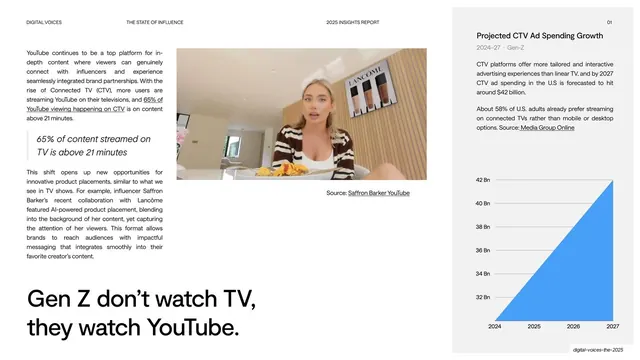
A dot-matrix chart mapping the Inspire, Engage, and Inform content modes across seven channels, filled colored dots marking which mode suits each platform.
Summary
A platform-fit matrix: three labeled rows (Inspire, Engage, Inform) cross seven channel columns (OOH, TV, VOD, Display Ads, Social, Email, Owned Channels), with a colored dot where a mode applies and a grey dot where it does not.
Visual description
Standard hairline header (section "Video Guidelines", subsection "Foundations", page 79). The left column holds the headline "Informing our decisions by the platforms our content will be seen" and a short intro. The right two-thirds is a large cream rounded panel containing a dot grid. Seven channel labels run across the top. Three rows down the left, each labeled with the mode name and a short colored rule (violet Inspire, poppy Engage, lilac Inform). At each row/column intersection sits a circle: filled in the row's color when that mode fits the channel, or light grey when it does not, all linked by faint horizontal connector lines.
Key takeaway
Reducing a strategy decision to a readable dot matrix: a filled colored dot versus a grey one instantly shows which content mode belongs on which channel. Reusing the same three colors and labels from earlier pages makes the system feel cohesive rather than invented per slide.
Reuse notes
A reusable pattern for any capability, fit, or coverage matrix (features by plan, channels by audience, etc.). The filled-versus-grey dot encoding scales to many columns while staying legible. Pairs naturally with the preceding Inspire/Engage/Inform pages as the applied payoff.
From this deck: Docusign content-by-platform dot matrix
View deck

































More like this


Keep what you find
A free account saves references to boards and can send you a weekly email of picks based on what you save.
To see every result, go Pro.