Preview image. Unlock full-res
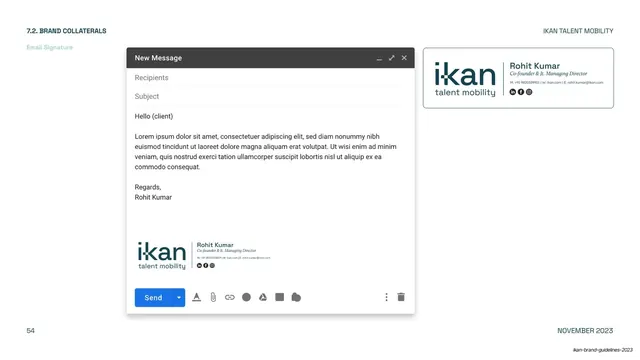
Email signature guidance shown inside a Gmail compose window mockup alongside an enlarged signature block with logo, name, title and social icons.
Summary
The email signature page: a Gmail "New Message" compose mockup showing the signature in place, beside an enlarged, boxed version of the signature block.
Visual description
A white page labeled "7.2. BRAND COLLATERALS / Email Signature" top-left, with "IKAN TALENT MOBILITY" and "NOVEMBER 2023" at the corners. The left two-thirds is a realistic Gmail compose window ("New Message", Recipients/Subject fields, a lorem email body and "Regards, Rohit Kumar"), with the branded signature sitting at the bottom above the blue Send button. The right shows the same signature enlarged in a thin-bordered box: the ikan logotype and "talent mobility" on the left, a vertical divider rule, then the name "Rohit Kumar" in sans, italic-serif title, a contact line, and a row of round social icons (LinkedIn, Facebook, Instagram).
Key takeaway
Documenting the signature both in its real environment (the Gmail compose window) and as an isolated, magnified spec block, so staff see exactly how it should look in the client and can copy the exact layout. The logo / divider rule / name-and-title / social-icons structure is a tidy, portable signature grammar.
Reuse notes
Closes the brand-collaterals run (slides 48 to 54). Reusable as the email-signature page in any guideline: pair an in-client mockup with a zoomed spec. The vertical divider between logo and details, the italic-serif title, and the social-icon row are the elements worth standardizing.
From this deck: IKAN email signature spec
View deck








More like this
Keep what you find
A free account saves references to boards and can send you a weekly email of picks based on what you save.
To see every result, go Pro.