Preview image. Unlock full-res
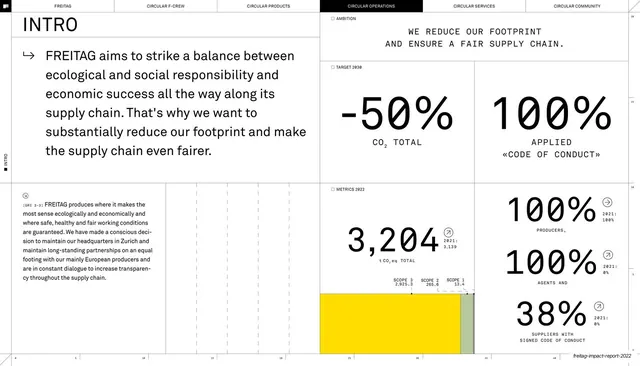
Chapter-opening spread pairing a serif intro statement with oversized monospace stats, including a minus 50 percent target and a column of 100 / 100 / 38 percent figures.
Summary
The Circular Operations intro spread: a large serif statement about balancing ecology, fairness and economics fills the upper-left, while oversized monospace stats fill the rest, a "-50% CO2 TOTAL" and "100% APPLIED CODE OF CONDUCT" target pair up top and a "3,204 t CO2e" figure with a 100% / 100% / 38% column below.
Visual description
The six-tab header (CIRCULAR OPERATIONS active) sits on a hairline. Upper-left, an "INTRO" kicker and arrow lead a large serif paragraph; upper-right, an "AMBITION" label tops the all-caps statement "WE REDUCE OUR FOOTPRINT AND ENSURE A FAIR SUPPLY CHAIN.", under which a "TARGET 2030" row shows two giant monospace figures, "-50%" (CO2 TOTAL) and "100%" (APPLIED CODE OF CONDUCT). The lower band carries a "METRICS 2022" label, a very large monospace "3,204" with t CO2e and a small scope-split stacked bar in yellow and grey-green, beside a right-hand stack of monospace "100%", "100%", "38%" figures each with a circular arrow icon and prior-year note. Hairline rules zone the page; ticks edge the base.
Key takeaway
The chapter-intro system reused with discipline: serif narrative on one side, a cluster of oversized monospace stats on the other, mixing a forward-looking target ("-50%") with current-year actuals. Setting the numbers in monospace gives them an instrument-readout authority and visually separates data from the serif prose.
Reuse notes
A reusable opener for any report chapter or pitch section that leads with a target plus supporting KPIs. The monospace big-number treatment with circular arrow deltas is a clean way to show metrics with year-on-year direction. Keep the figures to a small, scannable set; the layout depends on whitespace around each number to read as a dashboard rather than a wall of digits.
From this deck: Operations intro with minus 50 percent and stat grid
View deck

More like this
Keep what you find
A free account saves references to boards and can send you a weekly email of picks based on what you save.
To see every result, go Pro.