Preview image. Unlock full-res
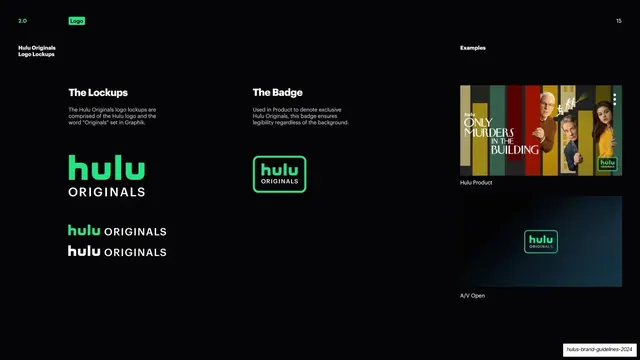
Detail page for the Hulu Originals lockups and badge, with two product and AV usage examples on the right.
Summary
The Hulu Originals detail page: the stacked "Originals" lockups and the green-framed Originals badge, shown beside real product and AV examples.
Visual description
Near-black background. Left column, under a bold white "Hulu Originals Logo Lockups" rail label, shows "The Lockups": a large stacked hulu/ORIGINALS mark plus two smaller inline green and white variants. Middle column, "The Badge", shows the green-outlined Originals badge with a note that it ensures legibility in product. Right column, "Examples", stacks two screenshots: a "Hulu Product" tile for "Only Murders in the Building" with the Originals badge, and an "A/V Open" frame with the badge centered on a dark glow. A page number sits top-right.
Key takeaway
Pairing each lockup spec with a real in-context example (product tile, AV open) on the same slide, so the rule and its application sit together. The consistent left-spec / right-example rhythm makes the lockup pages predictable.
Reuse notes
A reusable detail-page template for a sub-brand lockup: lockups, badge, then live examples. Strong for brands that appear inside product UI and motion. Needs real screenshots to carry the examples column.
From this deck: Hulu Originals logo lockups
View deck






More like this
Keep what you find
A free account saves references to boards and can send you a weekly email of picks based on what you save.
To see every result, go Pro.