Preview image. Unlock full-res
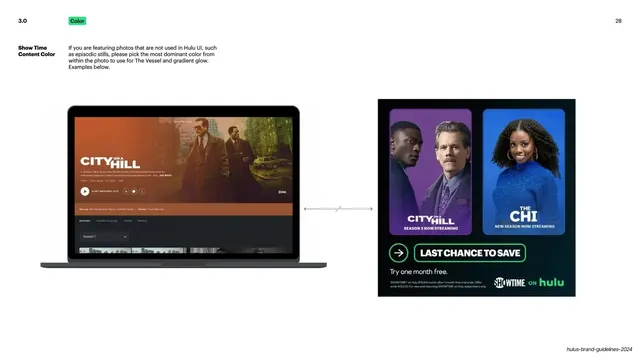
Light slide showing how to pick a dominant vessel color from non-UI episodic stills, with a City on a Hill UI and a Showtime banner example.
Summary
A continuation example: when artwork is not from Hulu UI, sample the most dominant color in the photo for the vessel and glow, shown with a City on a Hill still and a Showtime promo.
Visual description
White ground. Top-left: "3.0" number and green "Color" pill; "28" top-right. A left label "Show Time Content Color" with a paragraph instructing that for photos not used in Hulu UI, such as episodic stills, pick the most dominant color from within the photo for The Vessel and gradient glow. The body shows a MacBook with an orange-toned "City on a Hill" detail page on the left, joined by a horizontal double-headed arrow to a dark "Last Chance to Save" Showtime-on-Hulu banner on the right pairing a purple "City on a Hill" panel with a blue "The Chi" panel and a green play icon.
Key takeaway
Extending the same vessel-color rule to a new source (episodic stills) with one clear instruction and a paired before/after. Keeping the exact layout of the previous example slide (laptop, double arrow, banner) signals it is the same workflow on different inputs.
Reuse notes
Reuse as a follow-on example slide when a rule has multiple input cases. The repeated source-to-output arrow layout makes a series of cases feel like one consistent method. Needs representative stills and finished banners.
From this deck: Hulu episodic stills color sourcing
View deck











More like this



Keep what you find
A free account saves references to boards and can send you a weekly email of picks based on what you save.
To see every result, go Pro.