Preview image. Unlock full-res
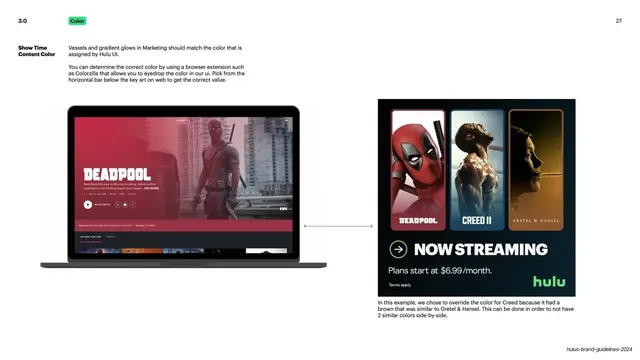
Light slide pairing a Deadpool UI still with a Now Streaming banner to show matching and overriding vessel colors from key art.
Summary
A worked example showing how to eyedrop a vessel/glow color from the Hulu UI and reuse it in marketing, including an intentional override when two titles clash.
Visual description
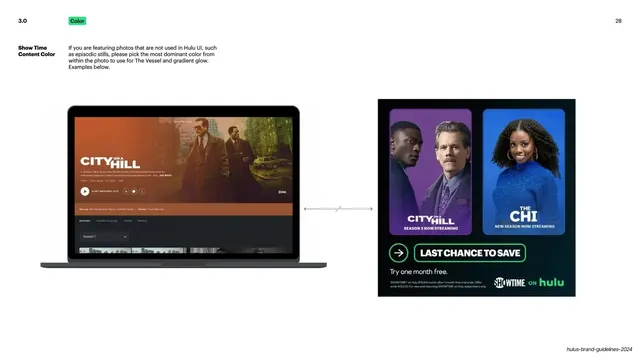
White ground. Top-left: "3.0" number and green "Color" pill; "27" top-right. A left label "Show Time Content Color" over two paragraphs explaining that vessels and glows in marketing should match the color Hulu UI assigns, and that you can eyedrop it with a browser extension like Colorzilla from the horizontal bar beneath the key art. The body shows a MacBook with a red-toned "Deadpool" detail page on the left and, connected by a horizontal double-headed arrow, a dark "Now Streaming" banner on the right featuring Deadpool, Creed II and Gretel & Hansel posters with a green circular play icon and "Plans start at $6.99/month." A caption notes the Creed color was overridden to avoid two similar browns side by side.
Key takeaway
Documenting an exact, tool-specific workflow (eyedrop the UI's assigned color with Colorzilla) plus the judgment call to override a sampled color when adjacent titles clash. The double-arrow linking source UI to output banner makes the cause and effect explicit.
Reuse notes
Reuse for any guideline that needs to enforce color consistency between systems while leaving room for art-direction overrides. Naming the actual tool and showing source-to-output with an arrow makes the rule actionable rather than aspirational.
From this deck: Hulu content color matching example
View deck








More like this

Keep what you find
A free account saves references to boards and can send you a weekly email of picks based on what you save.
To see every result, go Pro.