Preview image. Unlock full-res
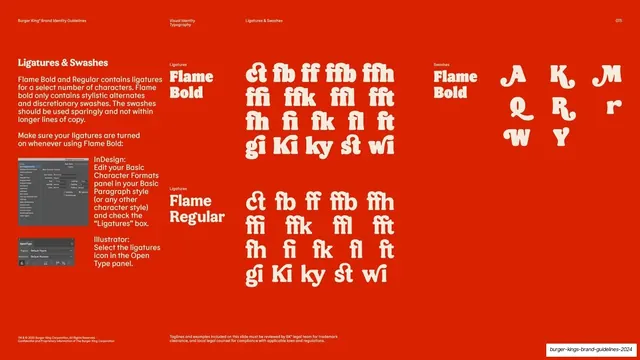
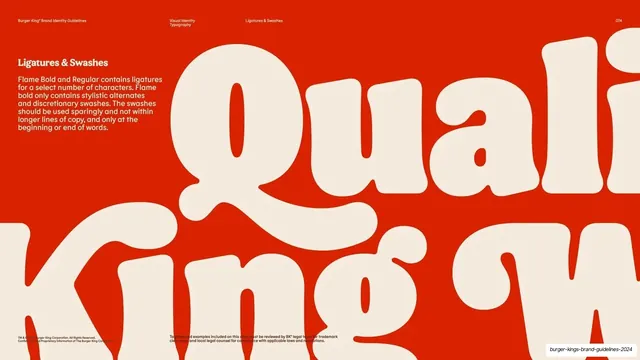
Red reference page listing the ligature and swash glyphs for Flame Bold and Regular with InDesign and Illustrator how-to.
Summary
A glyph-reference page for ligatures and swashes: grids of the actual ligature pairs for Flame Bold and Regular, a swash set, and small software screenshots showing how to enable them.
Visual description
Red ground, cream type, multi-column. A left column carries the "Ligatures & Swashes" heading and copy, plus two small grey UI screenshots (an InDesign character-formats panel and an Illustrator OpenType panel) with captioned instructions to turn ligatures on. The center column is headed "Ligatures / Flame Bold" and shows a tidy grid of ligature glyphs (ct, fb, ff, ffb, ffh, ffi, ffk, ffl, fft, fh, fi, fk, fl, ft, gi, ki, ky, st, wi); below it, a matching "Ligatures / Flame Regular" grid repeats the set. A right column headed "Swashes / Flame Bold" shows large swash capitals and alternates (A, K, M, Q, R, r, W, Y). Header chrome and page number "075" run along the top.
Key takeaway
Giving the OpenType features a literal reference table plus the click-path to switch them on in InDesign and Illustrator, so the rule comes with the means to follow it. Splitting ligatures (Bold and Regular) from swashes into separate labelled grids keeps a dense page scannable.
Reuse notes
The practical counterpart to the ligatures intro page. Reuse the glyph-grid-plus-software-screenshot pattern whenever a typeface ships OpenType features that designers must actively enable. Update the screenshots to the tools your team actually uses.
From this deck: Ligatures and swashes specimen
View deck



































































More like this







Keep what you find
A free account saves references to boards and can send you a weekly email of picks based on what you save.
To see every result, go Pro.