Preview image. Unlock full-res
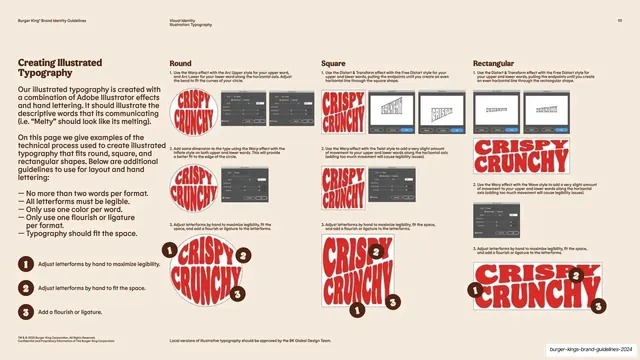
Cream how-to page with three columns (Round, Square, Rectangular) showing red CRISPY CRUNCHY lockups evolving through Illustrator warp screenshots and numbered hand-tweak steps.
Summary
A technical how-to page that demonstrates building the illustrated lettering across three packaging formats (Round, Square, Rectangular), each column stepping a red "CRISPY CRUNCHY" lockup through Adobe Illustrator warp screenshots and numbered hand-adjustment stages.
Visual description
Warm cream background with the running header and page "111." The left column holds the bold brown "Creating Illustrated Typography" heading, a serif explainer about combining Illustrator effects with hand lettering, and a bulleted rule list ("No more than two words per format," "All letterforms must be legible," "Only use one color per word," and so on), followed by three brown numbered circle keys describing the hand steps. The right three columns are headed Round, Square, and Rectangular. Each column shows the red "CRISPY CRUNCHY" lockup progressing top to bottom: a first warped state with a small Illustrator dialog screenshot beside it, a second refined state with another screenshot, then a final hand-adjusted lockup annotated with the brown numbered circles (1, 2, 3) marking where flourishes and tweaks were added. Dotted bounding boxes show the target shape. A small centered footnote and legal note sit at the bottom.
Key takeaway
Showing the actual production recipe, including the software dialog screenshots, so a bespoke effect can be reproduced consistently by any designer. Splitting the same word across Round, Square, and Rectangular columns proves how one system adapts to different package shapes, and the numbered-circle annotations tie abstract rules to concrete spots on the artwork.
Reuse notes
Ideal for a guideline page that must teach a repeatable craft technique, not just present a finished result. The three-format column structure transfers to any system with multiple aspect ratios or container shapes. Including tool screenshots dates the page to a specific app version, so refresh them when the workflow changes.
From this deck: Creating illustrated typography process
View deck
More like this
Keep what you find
A free account saves references to boards and can send you a weekly email of picks based on what you save.
To see every result, go Pro.