Preview image. Unlock full-res
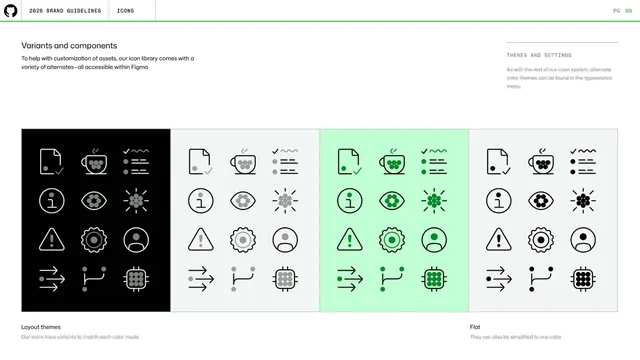
Icon variants page showing the same spot icons across four color modes (black, light, green, flat) in side-by-side panels to demonstrate theming.
Summary
A page showing icon color variants by repeating the same twelve spot icons across four themed panels (dark, light, green, flat) to prove the library adapts to every color mode.
Visual description
A left intro ("Variants and components ... all accessible within Figma") with a top-right "THEMES AND SETTINGS" note. Below, one wide band split into four equal panels, each holding the identical 3-by-4 set of spot icons in a different treatment: a black panel with white-and-gray icons, a light-gray panel with dark icons, a green panel with dark-green icons, and a second light panel labeled "Flat" with single-color icons. Captions read "Layout themes / Our icons have variants to match each color mode" and "Flat / They can also be simplified to one color." Standard header and green rule above.
Key takeaway
Demonstrating icon theming by holding the icon set constant and varying only the color mode across parallel panels, mirroring the same constant-composition technique used for the color theme pages.
Reuse notes
Reusable for documenting any themeable asset set. Repeating the exact same icons in each mode makes the variants directly comparable and reassures that coverage is complete.
From this deck: GitHub guidelines - icon variants and themes
View deck

































More like this




Keep what you find
A free account saves references to boards and can send you a weekly email of picks based on what you save.
To see every result, go Pro.