Preview image. Unlock full-res
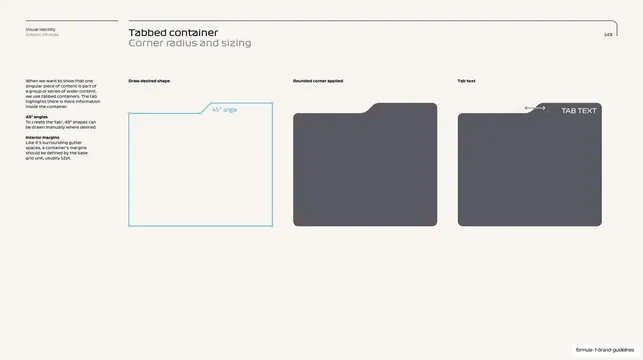
Three-step construction page for the tabbed container, drawing the 45-degree tab, applying the corner radius, then adding tab text.
Summary
A left-to-right construction sequence for the tabbed container: draw the shape with a 45-degree tab, round the corners, then place tab text, used to flag grouped or extended content.
Visual description
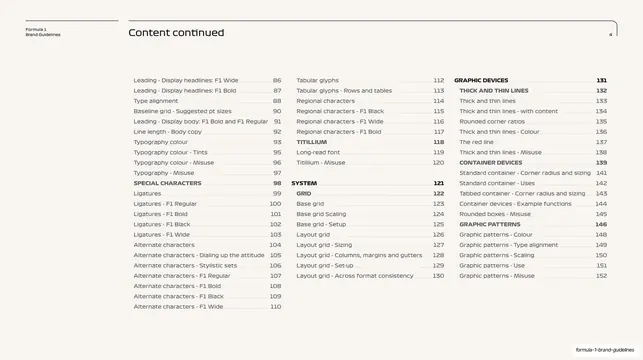
Cream (#F4F0E8) page with the standard header (title "Tabbed container / Corner radius and sizing", page "143"). The left column explains the device with bold lead-ins ("45 angles", "Interior margins") noting the tab is drawn manually and margins follow the 12pt base grid. The main area runs three stages across: "Draw desired shape" shows a blue vector outline of the container with a flattened top-right corner and a "45 angle" callout; "Rounded corner applied" shows the same shape filled slate-grey with the tab corner softened and faint red construction marks; "Tab text" shows the finished grey container with a small arrowed measurement and the words "TAB TEXT" set into the angled tab.
Key takeaway
Teaching a custom shape as a numbered build sequence (vector outline, then fill and radius, then label) so anyone can recreate it precisely. The 45-degree manual tab is a simple way to signal "this belongs to a group" or "more here" without an icon.
Reuse notes
A clear template for documenting any bespoke shape or component that needs step-by-step construction. The blue-outline-to-grey-fill progression reads as an editing workflow and is reusable for other geometry specs. Sits naturally beside the standard-container pages and the example-functions page.
From this deck: Tabbed container construction spec
View deck






























More like this


Keep what you find
A free account saves references to boards and can send you a weekly email of picks based on what you save.
To see every result, go Pro.