Preview image. Unlock full-res
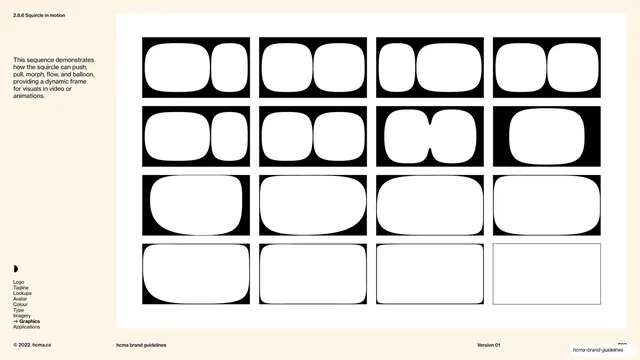
A graphics page showing the squircle's animation range as a 4x4 grid of black-and-white frames where the rounded shape pushes, pulls, morphs and balloons.
Summary
A graphics page laying out the squircle's animation vocabulary as a 4x4 grid of frames, each a black panel with a white shape caught mid-push, pull, morph or balloon.
Visual description
Warm cream background, section number "2.8.6 Squircle in motion" top-left on a hairline rule. The left text column explains the sequence demonstrates how the squircle can push, pull, morph, flow and balloon, providing a dynamic frame for visuals in video or animations. The right two-thirds is a white panel holding sixteen equal landscape cells in four rows of four, read as a frame-by-frame storyboard. Early frames show two rounded shapes side by side; through the sequence they squeeze, split, merge into a single broad squircle, then expand toward the edges until the final frame is an almost-rectangular thin-outlined shape. The whole sequence is rendered as white forms on solid black, except the last outline-only frame. The persistent left-rail section index (Graphics in bold with an arrow) and the standard footer sit on hairline rules.
Key takeaway
Documenting a brand shape's motion behaviour as an explicit storyboard grid so animators have a defined vocabulary (push, pull, morph, flow, balloon) rather than improvising. The high-contrast white-on-black keyframes read as a film strip and make the transformation legible at a glance.
Reuse notes
A forward-thinking page for brands that will live in video, motion graphics and animated UI. Translate these keyframes into actual easing and timing specs for production. The motion is genuinely shown here as a frame sequence, which is why a motion tag is warranted; a single static shape would not justify it.
From this deck: Squircle in motion states grid
View deck






More like this





Keep what you find
A free account saves references to boards and can send you a weekly email of picks based on what you save.
To see every result, go Pro.