Preview image. Unlock full-res
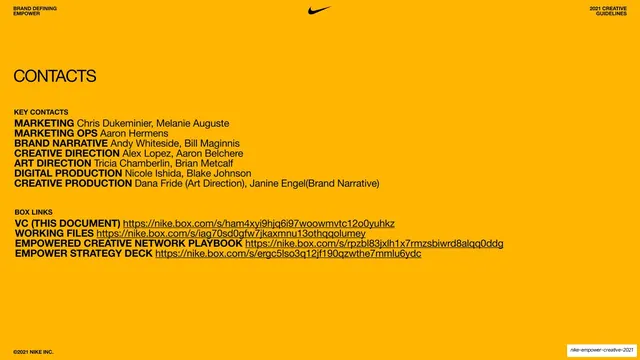
An orange contacts page listing key team members by role and a set of shared Box file links.
Summary
A practical contacts-and-resources page: a warm orange slide listing the project team by function and the shared Box links to working files.
Visual description
Flat orange background, black type. A serif "CONTACTS" heading sits upper-left. Below, a "KEY CONTACTS" block lists roles in bold sans with names in regular weight: Marketing, Marketing Ops, Brand Narrative, Creative Direction, Art Direction, Digital Production, Creative Production. A second "BOX LINKS" block lists four labeled resources (VC document, Working Files, Empowered Creative Network Playbook, Empower Strategy Deck) each followed by a long nike.box.com URL. Standard utility header runs across the top and "©2021 NIKE INC." anchors the bottom-left.
Key takeaway
The role-then-name pattern (bold function label, light name) makes a contact directory scannable by responsibility rather than alphabetically. Pairing contacts with the actual asset links on the same closing-utility page keeps everything a collaborator needs in one place.
Reuse notes
A clean reference for a contacts, credits, or resources page at the back of a guideline or playbook deck. The two-block layout (people, then links) is directly reusable. Flat color plus restrained type keeps a reference page from feeling like an afterthought.
From this deck: Contacts and Box links page
View deck



































































































More like this





Keep what you find
A free account saves references to boards and can send you a weekly email of picks based on what you save.
To see every result, go Pro.